np.r_[] , np.c_[] 그리고 reshape에대해
np.c_[] 함수는 데이터에 새로운 데이터 열을 추가
np.r_[] 함수는 데이터에 새로운 데이터 행을 추가
|
1 2 3 4 5 6 7 8 9 10 11 12 13 14 15 16 17 |
print(housing.target.reshape(-1,1).shape) x = np.array([[1,1,1,1], [2,2,2,2], [3,3,3,3]]) print("원래 데이터:\n",x) x_c = np.c_[x,np.ones((3,1))] print("끝열에1을 추가:\n",x_c) x_c = np.c_[np.ones((3,1)),x] print("첫열에1을 추가:\n",x_c) x_r = np.r_[x,np.ones((1,4))] print("끝행에1을 추가:\n",x_r) x_r = np.r_[np.ones((1,4)),x] print("첫행에1을 추가:\n",x_r) |

numpy.reshape
np.reshape(a, newshape, order=’C’)
데이터를 변경하지 않고 배열에 새로운 모양을 지정하는 함수.
매개변수 :
- a : (array_like) 재형성할 배열
- newshape : (int or int의 튜플) 새 모양은 원래 모양과 호환되어야 한다. -1을 사용하여 후의 계산을 맡길 수 있다.
- order={‘C’, ‘F’, ‘A’} 선택사항 : 중요한 것이 아님으로 사이트 참조
사용코드 :
|
1 2 3 4 5 6 7 8 9 10 11 12 |
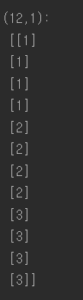
x = np.array([[1,1,1,1], [2,2,2,2], [3,3,3,3]]) print("데이터형태:\n",x) x_new = x.reshape((1,12)) print("\n(1,12):\n",x_new) x_new = x.reshape((4,3)) print("\n(4,3):\n",x_new) x_new = x.reshape((2,6)) print("\n(2,6):\n",x_new) x_new = x.reshape((-1,1)) #열이 1이고 나머지는 너가알아서 print("\n(12,1):\n",x_new) |

예시 : housing 데이터
|
1 2 3 4 5 |
from sklearn.datasets import fetch_california_housing housing = fetch_california_housing() print("housing 정답데이터 형태:\n",housing.target.shape) print("\nreshape한 데이터 형태 :\n",housing.target.reshape(-1,1).shape) |

텐서플로우는 위의 경우처럼 (20640, ) 형태로 되어있으면 (20640,1)로 인식을 하지 못하기 때문에 열을 변경시켜줘야 한다.
